 Pokemas Lab
POKEMAS LAB GUIDE
Team Firepower Explorer guide
Single-target versus area damage? How many damage dealers? Combine attackers and helpers intoa three-pair team candidates.
one-hit damage under prepared conditionsDamage indices for setup sync → three attacks → damage sync. First choose a type and run the search. Defaults compare both one-target and all-enemy damage.
Open Team Firepower Explorer ↗
1. Choose the damage objective
Choose either or both damage objectives. Enabling both runsa search for each objectiveand displays their results separately.
| Metric | What is compared | When to use it |
|---|---|---|
| Damage to one target | One enemy's index after area-move damage spread. | Focus damage on one enemy, such as the central target. |
| Total damage across all enemies | Single-target index × actual target count. | Compare damage across all enemies. |
Single-target moves also enter total-damage searches.If a strong single-target move exceeds an area move's total, that team may rank higher. Changing the remaining enemy count from one to three also changes area-move evaluation.
Indices exclude enemy Defense, Sp. Def, reduction and random rolls. Enemies share the same weakness and resistance settings, with no remaining-HP cap. Open the damage calculator for actual damage estimates.
2. Choose the number of damage dealers
Choose one, two or three damage dealers. In this tool, a damage dealer meansa pair responsible for damage. Any normal role may fill that function, or you can restrict it to Strike or EX Strike.
- One damage dealer:Damage dealer One damage dealer and two helpers. Each pair attacks once.
- Two damage dealers:Damage dealer Two damage dealers and one helper. Each pair attacks once.
- Three damage dealers:All three damage dealers attack once.
Every setup has three attacks, one per pair. Helper damage is included, and indices are simply added. No averaging or team-size adjustment is used. Helpers may use physical or special moves, which are also searched.
First use aSetup sync; its damage is excluded while sync buffs, fields and boosts carry over. Each pair then attacks once, followed byDamage sync. The default objective sums the damage sync and three attacks. The three-attack objective also excludes damage-sync damage.
Setup-sync owners prioritize Support, EX Support and sync-buff skills. If none qualify, a damage dealer is used. Damage-sync owners are damage dealers.Fix both sync owners. The same pair may own both syncs.
3. Set your roster and search conditions
Damage dealer and helper names may both be left blank for automatic selection. Names are optional.
- Move type, kind and attack category:Narrow the desired attack candidates.
- Damage dealer Fixed owner:Enter and select the desired pair. Leave blank for automatic selection. With multiple damage dealers, this fixes dealer 1.
- Fixed helper:Fix one helper of any normal role. Three-damage-dealer teams have no helper slot, so this setting does not apply.
- Roster and search pool:Initially all pairs are eligible. Exclude unowned pairs in results and restore them from the roster list. Exclusions and individual move levels are saved automatically in this browser.
- Move level, 6★ EX, EX role and Superawakening:Match your roster's upgrades. Individual move levels take precedence; unspecified pairs use the default level.
- Enemy and rules:Set enemy count, supereffective hits and physical or special damage immunity.
Physical and special restrictions apply toDamage dealer moves only. Either category allows mixed teams. Helpers can provide fields, stats, master effects and sync buffs regardless of category. A fixed helper is used regardless of its role.
With 6★ EX and EX roles enabled, Field-role effects apply before each owner's first sync. Higher damage ranks higher; no role is favored unconditionally.
Requiring a normal Support enforces the normal Support role. Same-type mode restricts all three starting types.
Choose starting sync buff 5 or 0. The default is 5, without cheering. Starting at 5, one sync normally reaches 6 or EX Support reaches 7. Starting at 0 gives 1 or EX Support 2. Owner skills may add further sync buffs; check the result breakdown.
Standard search uses 24 attack candidates; wider search uses 64. It narrows helper combinations to the top 48 teams (wider search:: 96 teams) and evaluates moves, attack orders and both sync owners. Recheck promising teams with a wider search. Candidate filtering means this is not a guaranteed exhaustive optimum.
next to search conditionsReset search settingsresets fixed owners and grids, retains the saved roster and move levels, and clears displayed results.
4. Read results and preparation
Find a three-pair team— click to show results on this page. First compare each objective's best candidate, then the detailed teams below. Check the setup sync, three attacks and damage sync, including each index and total.
- Team and chosen moves:Which pairs attack and which provide support.
- Sync owners and sync buffs:Who owns setup and damage syncs, and how the sync buff changes.
- Indices and target counts:One enemy, or the sum across multiple enemies.
- Preparation order:The order of weather, terrain and zone setup. Check placement when entry effects create fields.
- Modifier breakdown:Applied stat buffs, fields and boosts.
- Unapplied damage effects:Effect names and reasons, as hints for checking prerequisites or multipliers.
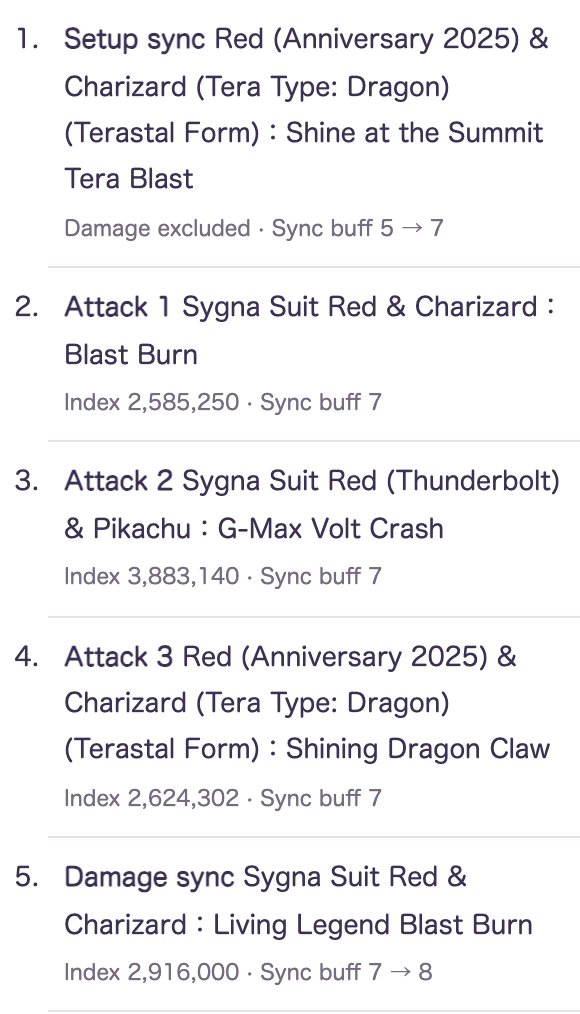
For each attack,Adjust this attackopens the damage calculator in another tab with that attack's settings. Enter enemy Defense or Sp. Def and adjust modifiers to estimate actual damage.
Complete preparation and attack while field effects remain active.
Check buddy-move activation and other conditions in the displayed descriptions and the game.
Example: Compare three-target Psychic challenge teams →
5. Try a Dragon team
Try the following settings for two special damage dealers. Keep conditions fixed and compare different dealer counts too.
- Enable both one-target and all-enemy objectives.
- Select two damage dealers and a special team.
- Choose Dragon as the move type.
- Damage dealer to Dawn (Champion)&and Palkia's Origin Forme.
- Set the helper to Lucas (Champion)&and Dialga's Origin Forme, then enable same-type mode.
- Search with starting sync buff 5, three enemies, move level 5, 6★ EX and EX roles unlocked.
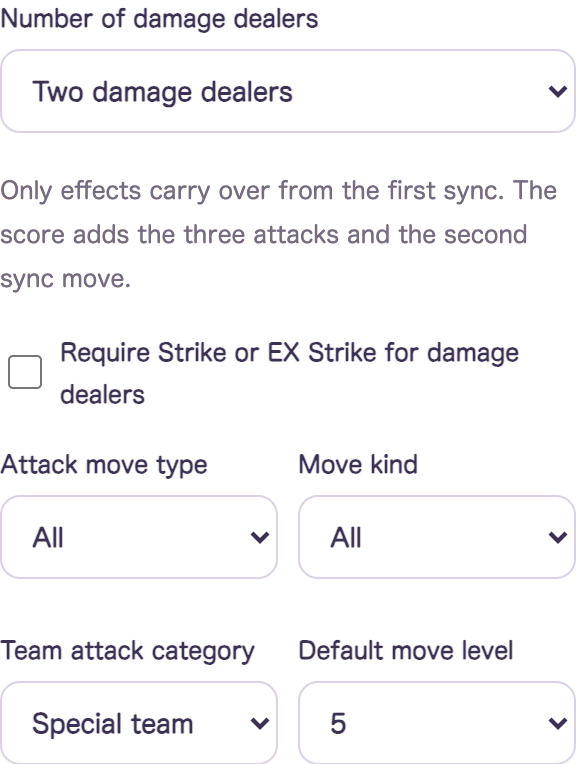
Compare team indices, exclude unavailable pairs and search again. Sync buffs, target counts and upgrades can change rankings. No result establishes the best team for every battle.
Share a team URL
The result'sShare this team → Copy URL— click and paste the link into your own message. It opens the same three pairs, grids, conditions and damage breakdown.
Results displaythe simulation at sharing time. Anyone with the link can view it, but your full roster is excluded. Opening a share does not overwrite your saved roster; restore it with the roster button. Recipients can change conditions and search the same three pairs again. New game data may change later results.
6. Check what the calculation includes
Attack and Sp. Atk passive stat multipliers are also included. HP and Terastallization conditions are assumed and highlighted. Weather and terrain conditions are matched against the team's field effects.
Includes base move power, initial level-200 stats, weather, terrain, zones, circles, master-passive team counts, identifiable stat buffs and selected numeric power increases and boosts.
Configure grid setups
Open each pair's grid settings and select a name from the suggestions. Searching and selecting a tile also adds its path. Defaults are no selected tiles and energy 60. Insufficient move levels, excess energy and disconnected grids are rejected. Higher limits require in-game expansions.
Applies grid stats, move power and skills with identifiable numeric effects. Results list selected tiles and energy. Unknown multipliers are listed as unapplied. Legal grids are not optimized automatically.
Equipment, lucky skills and unresolved damage multipliers are not applied automatically.Adjust extra damage-dealer modifiers or use the individual calculator. Do not duplicate automatically included effects. Extra modifiers apply only to dealer 1.
Single-ally support targets damage dealer 1. Animation, move gauge, field duration, survival and the progression from buddy-move activation to reactivation are excluded.
Move boosts and sync boosts are tracked separately and consumed when used. After-sync and after-attack effects cannot boost earlier hits retroactively. Limited-use setup moves reserve one use for the final attack; each pair has one max move.
Assumed HP, buddy-move activation, chance and external Break conditions are highlighted in yellow.Meet this prerequisite through other pairs' actions or other means.
Find candidates here, check actual damage with the damage calculator, then use the countdown tool for action routes.
Related:Damage Calculator · Countdown optimizer guide · Grid search guide · Guide index